When is 3G, like No-G?

When you have a weak signal, caused by being in the wrong place, electrical interference or a downed nearby tower.

I am an AT&T subscriber, and am deliriously happy with the AT&T AirCard I’ve been testing:

  • Plug-and-play operation (the software to connect is stored on a flash drive in the device).
  • Immediate access to either Wi-Fi or GSM (cell) with no login (the card identifies itself to the networks).
  • Reasonable management of Wi-Fi configurations (you know .. those painful WEP and WPA keys).
  • Cool feature: you can stuff a MicroSD into the device and store connectivity goo (configurations and files) directly on the device).

However .. it doesn’t quite have the stones to say: “I have an incredibly weak signal .. you should stop trying to get to the InterWebs using me”.

I’m certain the bandwidth is (on average) 1.5mbps .. however, if if packet failures (due to connection or interference errors) exist, they must be re-sent:

  • If half of the packets fail, you’re at an effective download / transfer rate of 750 mbps (not too shabby).
  • If three-quarters of the packets fail, you’re at an effective download / transfer rate of 375 mbps (decent).
  • If 90% of the packets fail, you’re at an effective download / transfer rate of 135mbps (reasonable .. back in the stone age, we called this DSL).

So, when is 3G really 3G? Well, it depends:

  • You have good cell coverage (more ‘bars’).
  • You’re in a low-traffic area (the more folks who log onto a tower the more folks .. which can include you .. get kicked off).
  • The algorithm on the wireless card seamlessly reconnects you should you get bumped (on a call, you get dropped .. but for Internet browsing and email synching, Nirvana is only a retry away).

Ready to try it? I was (and am glad). Is it worth the cost? Do the math. Consider:

  • Hotel rooms that charge $10 (or more) for a 24-hour period of Internet access. Three or four nights, and you’re even.
  • Coffee shops or wireless providers that charge $30 (less, or more) per month for the service .. then you have to find one of those providers (it’s not impossible, but when in a pinch, delays are significant stressors). Pay for one month .. you’re halfway there.
  • The inherent security risks of Wi-Fi Roguing (how do you know you didn’t just connect to a hacker-controlled honey pot? Pick up just one virus ..

Last but not least .. most important, actually: productivity losses when you’re offline. Yes: we can all survive when we’re disconnected. We can work offline, or send bits from our mobiles. However, I have encountered enough times where I needed to send something .. having connectivity would just have been easier.

I reference AT&T herein. They were the folks smart enough to loan me the card. With their return policy (read the fine print carefully), an AirCard is worth a try, especially since it’s on their dime. Other carriers provide the same services .. consider the deals .. read the fine print .. you know the drill.

I Just HAD to Have This Hat

TheHat20090518While visiting the University Street Fair, I noticed the unusual May sun building to a bit more heat on my pate than I’d have liked .. having just sunburned there whilst overseas a few months back (generating dandruff-type leavings that clogged my keyboard), I thought it best to cover up.

I started looking around for a frugally-priced baseball cap (well, there is an economic ‘reset’ going on) .. I would have accepted something emblazoned with the word “Mariners”.

No dice.

Then I passed the stand with these .. looked at one price and kept walking.

On the way back, I passed the stand again. Picked one up, held it over my head and looked in the mirror.

I put it back and kept walking.

I actually backtracked after a half-block, returning to the stand. I asked for help to find the right size. The vendor obliged, going to the trouble to find the hat with just the right tilt for “attitude” (like I need any more of that).

Had to have it.

I was briefed: “never pinch” and “always handle the hat by the brim”.

Sending some snaps around, I was able to collect the most fun comments:

  • “You’re finally old enough to wear that”.
  • “You remind me of my dad” .. and “You look like a dad” (the latter from my son, no less).
  • “Pimping” (the woman who cut my hair shortly after the purchase). Piece of work, that one.
  • “Just tell them your Jerrold” (one of the snaps was in front of a Subway sign .. I fixed the exposure on one of the images for this post, intended to remove that bit of the corporate-ness of the other image.
  • “Dapper” (talking to myself on the walk back home .. followed by “damn it”).

What do you think? Don’t be shy: I need a way to ensure I’ll stay humble.

When Will Credit Card Issuers Learn About Online Fraud?

I have my doubts if ever.

Back in 2007, I posted “Subjunctive Identity Theft .. From American Express?”, citing a real-world case where American Express had identified suspicious activity on my account and left me a voice mail message with an 800 number to call.

Upon calling, the first thing the operator requests is my account number. Are you kidding me?

Seems Bank of America hasn’t learned either. I traveled abroad recently and used my Visa for a purchase. This triggered a ‘suspicious activity’ alert (reasonable, as I was obviously out of country). I get a nice email, the gist of which is:

We detected irregular activity on your Bank of America Credit Card on 05/14/2009. For your protection, you must verify this activity before you can continue using your card.

What can I do? Well, I can call a US 800 number (collect .. but would still cost airtime or hotel surcharges), or I can visit a web site:

http://www.bankofamerica.com/myfraudprotection

Where the first thing they ask of you is to provide your credit card number:

BAMIrregular20090514

Wake up, gang .. you didn’t fool me, but you’ll get some folks.

Elsewhere in the email, they say:

Want to confirm this email is from Bank of America? Sign in to Online Banking and select Alerts History to verify this alert.

Then, I notice their last time login beacon for me is incorrect (it’s over six months old .. kids, I pay bills with Bank of America .. and I’m not six months late on any bills). So, is it the real site, or not? One last check. I open my account, and voila: no alerts when I log in and no alert history link to click.

So, what’s going on? Both Firefox and IE display a tidy green fill when the real Bank of America site is opened:

BAMGreenBars20090514

But, not so much on the http://www.bankofamerica.com/myfraudprotection site .. first of all, it redirects to https://myfraudprotection.bankofamerica.com/Welcome.aspx (redirects are always suspicious), and notice how there’s no green flood anymore?

Further, when you mouse over the security icon in Firefox, you get:

BAMFirefoxQuestion20090514

The site is verified by VeriSign and your connection is encrypted. But is it really Bank of America? See the “(unknown)”? Is this an unknown (to VeriSign) web hosting company, or has Bank of America simply not verified the site with VeriSign through proper channels? Sure the connection is encrypted, but a certificate for connection encryption isn’t that hard to get.

If you started reading this post thinking it was a statement of insecurity on the Internet, please understand: that’s how I intended it. However, either Bank of America has done something really, really stupid in the eyes of the non-trusting public, or the site is bogus, pointing to a server within their firewall that has been compromised.

I think I’ll watch the papers for a few days .. in the interim, I’m going to sit on hold for a while tomorrow when I get to the office .. will let you know what I learn.

While Signing Homework Tonight ..

.. I read Hunter’s list of necessities for a six-day camping trip, which follows (copied verbatim from his assignment):

  • Twelve Milky Way® bars
  • A Sonicare® toothbrush
  • Colgate® toothpaste
  • The huge tent we have
  • Five sleeping bags
  • Five pillows
  • Cassie’s Pink Godzilla plush
  • Bug spray to ward off mosquitoes
  • Christmas lights
  • A generator (solar powered)
  • Basically, I need a U-Haul® truck to carry it all, and a few of it with my backpack.

Someone has inherited my love of camping comfortably .. along with my sense of humor.

Someone at the WHO is rolling their eyes over this report ..

.. well, over having to write this report, to be exact; from MSNBC: “Pork is safe to eat, health officials say”. Seems the World Health Organization (WHO) has been under pressure to make the statement, no doubt by the pork lobbyists.

From the article:

Pork, ham and sausages are safe to eat, the World Health Organization said Sunday.

"You don’t get this disease through eating pork, and therefore there is no reason to be afraid of eating pork or pork products," said Dr. Peter Ben Embarek, a WHO senior scientist on food safety. "As long as pork is cooked the way we normally cook meat, there is no problem and no risk at all to get this disease."

"There is no reason to start destroying these wonderful, traditional cured products," Ben Embarek said. "You can continue to safely eat your prosciutto."

I can’t make this stuff up.

Jeez. I go away for a week .. and we build a campus mall?!?

MicrosoftCommons20090422Nobody tells me anything these daze.

I step out of town for a week, and voila, we have a mall!

This is all part of our new West Campus (created after tearing down shorter buildings a few years ago).

There are 14 restaurants and shops in the new mall and a soccer field to “boot“.

The non-mall part of these buildings will house the Entertainment and Devices division.

Re-reading some internal threads, there is a pub in the mall .. around which there has been much drama.

The pub will serve beer and wine after 3pm, or as part of catered events.

It will even be open during lunch hours for, well, lunch.

I hear of subdued opening ceremonies (no, Bono won’t be in attendance).

Seattle Times: “Microsoft workers get their very own mall, The Commons, on corporate campus”.

Mobile Phone International Roaming Tips

I had the pleasure to visit Moscow to work with my Strategic Emerging Business Team (SEBT) counterparts, partners and startups. It took only a tiny bit of research to discover that Moscow is the most expensive city in the world for a business traveler .. mobile phone roaming is only the start.

How expensive? $5.99 per roaming minute through my carrier. Wowza!

Thanks to my connection to a friend in the phone biz (who did the bulk of the work so I can enjoy this blogging moment of glory), I have some high-level tips (details and use cases below):

  • Obtain an unlocked mobile phone. Either advise your SIM-based carrier you’re traveling overseas and get the code from them, or buy a new unlocked phone on EBay. An unlocked phone lets you insert a SIM card that is seen as local to the country you are visiting.
  • Obtain a local pay-as-you-go SIM card for the countries you are visiting. You can do this in advance (links below), or once you arrive. With a local SIM, inbound calls are dirt cheap and outbound local calls are charged at local rates (which will vary by provider). Both are far less expensive than an international roaming rate in ALL cases. Also, with pay-as-you-go, you can add minutes at kiosks and know exactly how much you are spending .. no nasty surprises on your credit card statement.
  • If you are a PDA / Smartphone user, be prepared to carry two phones; one for data (even if by tether) and one for calls.
  • If you simply cannot live without data (I can’t), use your regular US-based phone for data, BUT:
    • Consider tethering your phone to your laptop and using the data connection from your laptop to synchronize your phone. This way, your calendar will be up-to-date.
    • Ask your provider to block international calls on your US-based phone while you’re traveling. Carrier terminology is “voice restrict” (just in case you get a newbie on the support line). Restricting overseas voice calls prevents the minimum one-minute charge for an incoming call (even if ignored and sent to voice mail).
    • Sign up for an unlimited international data plan with your cell phone provider rather than buying pay-as-you-go packages (which expire at the end of each month). Some due diligence on this is in order, of course.
  • I use AT&T as my mobile provider. While there are other SIM-based carriers out there, AT&T has done a glorious job of connecting all their (partner) networks for a seamless experience.
  • If your home-based business contacts (or loved ones, for that matter) are keen to reach you, obtain an US-based international forwarding number you can update on the Web. There are nominal costs to set up, and an annual charge to have this service, but it means you will always have a US number you can share. Note: do not forward your home or office phone as you’ll pay international charges for the call. Caveat: your company may have a service; check with them first. I like to use the service because it is a predictable cost; no surprises on my credit card. As you change countries and buy local SIM cards, update the forwarding service on the Web.
  • If you’re going to participate in conference calls, obtain the local number for the dial-in if your company or provider has one. With your local SIM, it’s a local call at outbound rates.
  • If you’re going to make a lot of out-of-country calls while traveling abroad, consider a local bounce-back service depending on the inbound-versus-outbound rates in the country you are visiting. In Russia, it’s a slam dunk ($5.99 per roaming minute); in some other countries, it may not matter as much. To use a bounce-back, you you dial the local bounce-back service number (local outbound call at local outbound rates) and hang up. The service calls you back (inbound call at local inbound rates) and asks you to dial the international number you want to reach. End result: you’re able to make an international call at local inbound rates. Note: the bounce-back service typically has a per-minute charge. However, this charge will be much lower than international rates.

I acquired an unlocked GSM phone and selected InTouch to arrange my international roaming. For my Moscow trip, I purchased:

  • A Russian SIM from MegaFon (Russia-local cellular provider) featuring:
    • Inbound calls at $0.01 per minute for MegaFon-Moscow network numbers and federal numbers subscribed to BeeLine, MTS and MSS Moscow (926 area code).
    • Other inbound calls at $0.09 per minute (including international).
    • Outbound calls at $0.03 per minute for MegaFon-Moscow network and federal numbers subscribed to BeeLine, MTS and MSS Moscow (926 area code).
    • Other outbound calls at $0.19 per minute.
    • Inbound SMS is free. Help your folks learn to send you texts prior to calling.
    • Outbound SMS at $0.03 per message.
      For other details, please see the InTouch SIM home page.
      Note: be sure to keep your SIM topped off; you’ll find kiosks all over Moscow.
      Note: if traveling outside Moscow, be sure to check the InTouch SIM home page for rates and other details.
  • The InTouch SmartForward service (US-based forwarding), featuring:
    • A US-based number (800 / 866 numbers are available) that forwards to a foreign SIM card.
    • Pay-as-you-go pricing at VOIP rates (quoted at the beginning of each call).
    • Automatic reload at $50 increments (despite the number of calls I was making, I never hit this).
  • The InTouch Bounce Back Plus service (callback service), featuring:
    • Trigger callbacks by local phone call, email or text messages.
    • Low-cost inbound calls from the system attendant.
    • Low-cost international calls via VOIP.
  • Unlimited international data roaming from AT&T. For my Microsoft phone, the domestic roaming service costs $45 / month. Adding the international brought the total monthly cost to $65. We get a discount from these retail prices, so this was a slam-dunk to keep me connected.
  • InTouch also sells / rents unlocked mobile phones if you want something new with a warranty.

Clearly a lot of information herein. Please let me know how I may clarify or expand.

The Worst Microsoft Product Names

We have tons of them, and only recently, I learned that code names need to be “places” (although i can think of several exceptions).

PC World treats us to: “The 10 Worst Microsoft Product Names of All Time”.

Back from Moscow

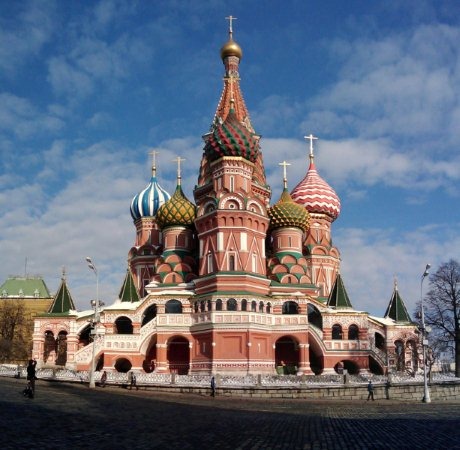
 KremlinBasil000_Stitch20090310Amazing trip.

Thanks to my SEBT colleagues in Moscow for great meetings this past week in Russia.

It was a highly successful visit, connecting with all the right people in the government and VC community.

Long story short: these are some incredible people; really smart folks, with whom I engaged.

I am honored to have been accepted into their midst.

Certainly, not all work and no play .. I had time to do a few walkabouts.

Time for lots and lots of pictures.

My hotel was a block from the Kremlin, in the heart of of the shopping district, right in the center of town.

275px-Mosmetro2008Seriously in the center of town .. check out the Metro (METPO) map; my stop was dead center, at the intersection of the red and green lines; my station name starts with OXO (click the image for a larger version).

I was glad I bought a new coat for the trip, and that I had a hat and gloves.

A scarf would have been a welcome addition .. stylish, to boot.

I got quite adept riding the Moscow Metro system to get most everywhere I needed to go.

The key for me was noting the first three (Cyrillic) letters of the last stop (to ensure I was on a train going in the right direction) .. reach out to me (opsan@opsan.com) if you find yourself traveling. Happy to assist.

Despite excellent directions (Metro only gets you to the target stop .. not to places above-ground), I did get lost once; just once.

That said, I feel you never really know a city until you’re lost in it 😛

I couldn’t have asked for nicer weather, albeit a bit cold. Nice and clear, as you’ll see from the pictures.

Three things that surprised me about Moscow:

  • Pineapple. It was everywhere: at every breakfast, in sauces and as garnish for dishes. I’m guessing that as it’s a great source of Vitamin C, and oranges don’t grow in the climate, that it’s a treat, yet a dietary staple. Other Tropical or “down-under” fruits made an appearance: Kiwi, Papaya, Mango. My guess: Cuba and the need to avoid Scurvy.
  • The employee-to-customer ratio. In every business I observed, there were receptionists, waiters, managers .. plenty of folks to take care of customers. Most weren’t very busy; there were lots of paperback novels and Sudoku books to be found .. but they were definitely on duty.
  • Even with such over-staffed conditions, service wasn’t very good, even at the nicer places I visited. Umm .. it was downright bad, actually.

Some links:

Kids made out like bandits; I brought Cassie a Matryoshka doll, t-shirts and Cossack hats for Connor, Conner and Hunter.

What .. Can’t this guy read?

NoStanding20090310