5W – Robotic Process Automation (RPA)

Thank you for reading! Please see “Why 5W?”  for context, methodology and disclaimers.

RPA Overview

Robotic process automation (RPA) is a modern-day (read: fancy) name for ‘macro‘, a use-case-specific execution of a series of steps to automate a task in a software program. Where macros are typically associated with a single application, RPA extends this paradigm across multiple applications, from on the desktop to the web and through service layers in commercial applications.

The end results: less switching between applications by users, fewer errors when moving data between applications, faster execution time, and more. Primary beneficiaries of RPA are end users, system owners and IT, who can manage RPA implementations centrally, standardizing and supporting overall integration efforts.

For context, consider comparing RPA to Macros. Macros are tiny, use-case-specific, user-recordable programs that enable end users to automate repeated tasks like formatting, copying formulas, moving data and so on. Users record keystrokes and trigger the action via a user-defined hotkey (Control-1, for example) to make changes to the target document. Macros were typically associated with a single application (i.e., Word, Excel, and more) .. but a few years back, Microsoft introduced Visual Basic for Applications (VBA), replacing Word Macros (Word Basic) and Excel Macros to execute actions across Office Applications and further extend the model. Where the original macros were application-specific (i.e., only worked and enacted document changes from their host application), VBA enabled users to launch and control other Office applications remotely. Examples include updating a table in a Word document from Excel, inserting graphics into a Word document from PowerPoint and more.

RPA extends this model even further, executing commands across multiple applications from the desktop. These include locally-installed (via API or keystroke), Browser- / Web-based (via web forms or Web Service layers) and through richly-defined service layers in commercial online applications. RPA automates computer tasks that are structured, routine and repetitive, placing the user in control of executing commands across multiple applications to get work done.

RPA is not a replacement for users, but a tool to execute small tasks across applications. This is especially helpful where tasks are repetitive, the number of users performing these tasks is significant and where the risks (and potential costs) of errors are significant. Using RPA saves users’ time and frees them to do other more important (and interesting) work for the company.

RPA automation (automation routines typically referred to as ‘bots’) can be small or large, individually- or centrally managed and perform unattended or attended (user intervention required at certain points) tasks for users and the company. An analysis of automatable tasks a company should consider should be performed through Discovery, and later through POC and thorough project planning. Best practice: write smaller bots to perform oft-used tasks that can be called by more complex routines.

Last, RPA is a platform implementation, meaning that focusing on customer use cases is of paramount importance. RPA must satisfy the use cases the customer needs the most, cost-effectively and with robust, but light-touch management.

RPA Business Benefits 

Organizations continually add and update LOB systems through necessity, digital transformation, upgrades, acquisition and other changes. These may be as simple as transitioning a paper process into a new application, or as complex as integrating a new subsidiary (and all the underlying systems within). This creates complexity within a company environment as existing LOB use cases are abruptly managed by different, or worse, LOB applications performing the same services to the business.

Adding and changing systems quickly puts the end user at the center, occurring at a rate where the user’s day-to-day activities become chaotic. Combine changes to systems with organizational restructure within a company, and you’ll quickly realize users are surrounded by multiple systems, entering, copying and pasting data between them in real-time. Some activities may include transformation calculations (currency and time zone, for example), applying business rules (expense account or purchasing limits), etc., increasing complexity and accuracy risk. End users face:

  • Many process touchpoints
  • Massive amounts of data
  • Disconnected Systems
  • Disparate Audiences
  • Manual Entry / Transformation
  • Risk of Errors

Most companies solve this by putting additional users into the mix, which increases costs, further increasing complexity and the risk of errors. It also calls into question the company’s training capabilities, where companies must consider:

  • The time it takes to train new employees across multiple applications.
  • Employee turnover in these departments.
  • Training effectiveness / veracity.
  • QA and audits for the affected systems.
  • Feedback loop to resolve errors and improve training.

Given organizations may not be able to integrate / consolidate / replace these systems in a timely manner through integration, consolidation or absorption. In an ideal world, cross-functional LOB applications would have:

  • A single interface with input consistency
  • Automatic business rules enforcement
  • Automation Calculations / Transformations
  • Centralized Management / Data Access
  • Alerting and routing for outliers and errors.

From a user perspective, most LOB systems appear isolated from each other, even though business use cases run in parallel, or may even overlap. Consider these two LOB applications:

  • Timekeeping software that records employee punch-in / punch-out for payroll.
  • Program management software that captures employee hours for project billing.

Both systems capture employee hours but for different audiences and purposes. If the timekeeping software had the capability to capture a project code, employees would need only access to one system to support both time tracking use cases. In most organizations, this kind of integration is simply not in place.

RPA Capabilities

The number of tasks users execute every day within an organization is staggering. This is especially true for companies who have multiple non-integrated systems with similar types of data (requiring manual data transfer, like cut and paste), legacy (even mainframe) source systems alongside operational systems, similar systems acquired through an acquisition, and so on. While automation cannot replace everything every user does, there exists a large number of tasks with aspects of repetition that can benefit from a level of automation. This is especially true if users are transferring data (with or without analyses) between systems that are not properly integrated. This is even more value if a large number of users are performing the same kinds of repetitive tasks across systems. More users, more systems, the more the chance of errors.

While every company has long-term IT Transformation initiatives that include integrating ‘all’ systems, not all systems should be integrated .. IT realizes this. Some systems have limited life spans (to be replaced or upgraded), others have limited operational audiences (so not worth the effort) or IT doesn’t have the bandwidth or the skill set, etc. Because of these factors, the systems are kept isolated and data transfer between them is left to the user. These companies are target-rich environments for an RPA implementation as an interim step toward eventual Digital Transformation.

RPA enables this, by supporting ‘lazy integration’, where users interact to perform pieces of data transfer activities between systems, in systems that lack full integration capabilities, have a short life, or other business factors.

To support end-customer use cases, capabilities to consider when evaluating an RPA operational platform include:

  • Desktop Analytics Framework: Allows for analysis of user interaction with applications to identify high-value application targets for RPA.
  • Centralized Management Console: IT monitors all RPA operations and assigns designates to manage individual and groups of users.
  • Role-Based Access Control (RBAC): IT sets policies that control user access, and allowed actions, preferably through (and integrating with) Directory Services and existing Group Policy.
  • System and Application API Connectivity: API connectivity should be used for any / all applications that support this access, preferably through a connector framework that includes commercial applications.
  • Monitoring / Alerting Framework: Real-time notification, governed by policy, delivered to devices.
  • Reporting / Analytics Framework: Dashboards containing Metrics and KPI assessment in an AAG display format.

This is a short, high-level list .. Industry-specific use cases will likely drive further capabilities.

From a functional perspective, the RPA platform must support multiple end-user operations. Please recognize the RPA approach to automation is from the User perspective (i.e., replacing connecting to, interacting with and keying into multiple systems). A short list of capabilities, presented from activities end users perform across multiple applications:

  • Launch Applications: Locally-installed, browser-based or through remote automation.
  • Secure Credential Storage: Necessary for multiple system and application logins.
  • Configuration / Scripting / Limited Coding Requirement: This is implied with RPA .. a library of configurable connectors is expected, providing a standardized means to access packaged applications without writing scripts or code. With that said, the capability to extend an operation through simple scripting (and limited coding) is a key differentiator for an RPA platform.
  • Log in to Applications: Local and browser-based (this includes finding the ‘user’ and ‘password’ fields as well as the ‘submit’ button).
  • Copy and Paste Data: While copy-and-paste are implied, the ability to navigate to the proper fields in the source and target applications is critical to ensure data arrives in the proper target fields.
  • Move files and folders: This includes local, remote and web-based folders; the latter will require configurable credentials. Note that once files reach their intended destination, there may also be requirements to allow access to other users / groups.
  • Extract and Process Data: This includes structured and semi-structured data, as well as from documents, PDFs, emails and forms. Recognize that many of the currently-manual interactions involve users looking at multiple screens / windows (source and target), performing standard (but executed ad-hoc) calculations entering data into the target systems.
  • Read and Write to Databases: If local, may require additional desktop implementation (ODBC, Native API, and so on), if remote is likely handled through a Web Services or Data Services layer.
  • Open Emails and Attachments: As above (extract and process), users will open emails and attachments, view and act upon the data therein.
  • Scrape data from Web Pages: As above (extract and process), open web pages, view and act upon displayed data.
  • Perform Transformations and Calculations: An RPA implementation needs the capability to acquire, calculate and transform data from one or more system sources and insert the results into the target system.
  • Extend (and Capture) ‘Tribal Knowledge’: Users take these kinds of operations for granted, just ‘knowing’ when a particular policy should be enforced. Unhappily, these kinds of operations don’t automate well, unless this knowledge can be captured as rules to improve the RPA implementation.

It is safe to presume that a robust RPA will manage the bulk of the tasks as described above. With that said, not all organizations need all the capabilities .. this can be teased out during Discovery with an end customer to amplify capabilities and applicability within their environment.

RPA Versus BPM

RPA versus BPM is a common question that will generate objections when approaching end customers. I go into detail on this on another W5 post.

Note that many organizations already suffer from system sprawl (multiple systems whose capabilities and audiences overlap) .. while most have not corrected this condition through integration or BPM (both of which require significant oversight and effort), some will have offerings in the works.

Does RPA replace BPM? Can it? It depends (it always does).

I mention above that RPA is a means to achieve ‘lazy integration’. Given that companies are likely managing multiple systems with overlapping capabilities and audiences (this means a lot of user intervention and suggests RPA opportunities), follows a few scenarios of which to be aware:

  • Multiple ERP, Payroll, accounting systems, etc., with which users must interact through individual interfaces.
  • Multiple operational facilities (call centers / manufacturing / data centers .. especially if these locations were added during acquisitions), requiring manual data acquisition / consolidation.
  • Combinations of SaaS and on-premises LOB applications performing similar functions, or where combining data provides improved context for operations and reporting.

RPA can provide a means for companies to provide many of the benefits of BPM avoiding a larger system migration. This is especially valuable to companies whose systems have limited life spans or limited audiences.

RPA Use Cases

A wide variety of companies can use RPA effectively to reduce errors, save time and release their staff for more important work. While any industry could benefit from an RPA solution, some sample use cases include:

Multi-System Integration

A robust RPA platform will enable IT and end users to connect locally-installed, SaaS-based and cloud LOB systems. An inventory of systems and use cases is a critical part an engagement conversation, amplifying the applicability of an RPA implementation within the end-customer environment. Key bits to capture include identifying these systems, the complexity of manual integration and the number of users who go through these manual operations. Capturing the amount of time users spend in these operations would be very helpful, but in many cases, initial contacts may only have ballpark estimates. Capturing more detail will help identify and illustrate pain points, capturing opportunities to drive the conversation forward.

Workflow Automation

A very common use case: document workflow, including expense reports, purchase orders, accounts payable and so on. Many companies have LOB applications that support internal approval workflows, but as soon as documents transition from one system to another (i.e., an approved expense report to writing a check or hours collected in a timekeeping application to a payroll system), a user typically sends an email notification to another advising there’s an action on their part. It’s fairly easy to point out the inability to track workflows once they leave one application .. noting the target application may not have any knowledge of an impending transaction as they lack a formal integration methodology.

Look-up / Transformation / Validation Functions

Three very common end-user activities:

  • Look-up: The user switches between systems to obtain a value from a source system (or systems) and cuts / pastes the result in the target system(s).
  • Transformation: The user performs calculations between source(s) and target(s) when pasting the data.
  • Validation: The user enforces business rules when obtaining / entering the data, which may result in outliers (data that requires further validation, say an expense report that’s over their approval limit and must be sent elsewhere).

You may surmise that these (and other, similar) user activities are prone to error, through activity (missing transactions), calculation and / or follow-on actions.

These use cases are the easiest to tease out during Discovery, recognizing the workflows and the present systems the customer is using are key data points when amplifying applicability within a prospect environment.

RPA Providers

The biggest competitor to RPA is home-built business processes .. manual or with some level of automation, perhaps shared macros or via SOP documents. These kinds of solutions rely heavily on Tribal Knowledge, introducing discrepancies between end users and making it difficult and time-consuming to train. Last, home-built processes are higher-risk than any delivered in a centralized automation platform. In-Market companies include:

There are a number of consolidations / symbiotic partnerships in process at any given time, so this list is somewhat fluid.

ED: As Article Publish dates are frozen in time, it is quite possible that reviewed vendors and their capabilities may have advanced beyond those presented herein. Please accept my apologies for my shortcomings. A note to vendors: please reach out to advise your current offering capabilities and I will update accordingly.

RPA Audiences

While IT will need to be consulted and engaged for coordination, system access and eventual implementation, conversations will likely start with business audiences within an organization. In short, it is the business that is most keen to streamline processes and reduce errors while awaiting a Digital Transformation effort. Consider some sample audiences and use cases that result in business efficiencies:

  • HR: onboarding / offboarding processes, review processes, access management request processes, integration across multiple HR systems (in anticipation of an HRIS solution).
  • Finance: Real-time, interactive access between disparate financial and LOB systems.
  • Customer Success / Support: Real-time, interactive access between multiple CRMs, Support, OM, WM, and other customer support systems.
  • Operations: Real-time integration across disparate time tracking and operational systems.

It is important to note business audiences are the most likely to recognize (and speak about) usability shortcomings of current systems and processes. Thus, they are better equipped to make the business use case for RPA efforts. These audiences are performing repetitive keystrokes / operations, which enables them to significantly enhance RPA-enabled functionality and usability.

I don’t want to leave IT out .. besides their eventual operational role, IT can benefit from a robust RPA implementation with:

  • Top-level management across disparate system processes (coordinating backups and off-site backup storage transfer operations across vendor implementations).
  • Initiating Automated Access management process across systems responding to requests from HR and other business entities.
  • Data management: bots can automate numerous data-related activities such as entry, migration, extraction and validation.
  • Network management: bots can monitor server and system connections and capture performance metrics. Bots can detect threats of unauthorized access and alert admins, including executing security controls to deny access in real-time.
  • IT helpdesk management: bots can apply rule-based technical support actions to incoming requests, providing self-help assistance prior to engaging with IT support.
  • Security management: bots can automate monitoring security logs for suspicious activity, detecting system vulnerabilities and threats of unauthorized access.

In fact, RPA can help guide IT in system identification and prioritization when considering a Digital Transformation effort. Further, RPA can be both a stopgap and enable rapid prototyping for a pending DT effort, while enabling the business to work more efficiently.

Conclusion

RPA helps organizations manage the path to an eventual digital transformation, whether in their roadmap or manifesting through external business activities. RPA helps to address accelerated integration requirements facing organizations and their end users through automation, thus creating efficiencies and reducing the possibility of errors surfacing performing redundant operations. RPA frees up human resources to focus on more complex and creative tasks, leading to increased productivity and efficiency. The broader an RPA implementation, the more value an organization will realize from the investment.

While RPA offers numerous benefits, it is important to remember that it is not a one-size-fits-all solution. Each organization must carefully evaluate unique needs and requirements before implementing RPA to ensure that it is the right choice for them. It is important to have a comprehensive plan for implementation and management to ensure the success of RPA adoption.

5W – Data Governance

Thank you for reading! Please see “Why 5W?” for context, methodology and disclaimers.

Overview

Data Governance (DG) makes its way quickly into the ‘bad word pile’ with most organizations, especially as they gain visibility to the responsibilities that fall to them when managing user data. Note that more and more RFPs are asking DG questions as part of their compliance when considering vendors.

The scope of DG is massive, encompassing Personally-Identifiable Information (PII), Personal Credit Information (PCI), Personal Health Information (PHI), inferred combinations of the above, PLUS business-sensitive data for both the company and their customers. ‘At Work’ data is still considered PII by regulatory organizations (opinion by the N3 legal team when referencing GDPR requirements for the EU), so must also be considered for DG policies and practices.

Last, data is no longer tucked safely behind the firewall of a company data center. Companies must take an integrated / hybrid approach to discover, catalog and manage data from a wide variety of sources.

A wrinkle for companies who manage client data: A company must maintain a custodial posture, thus closing the loop to acquisition, enrichment and return of client-owned data. DG is critical to these hand-offs, and must be managed effectively through policies, audited practices and documented enforcement should breaches occur. Part of this wrinkle is ‘data ownership’: where an organization acts as a custodian of client data for a duration, making the organization beholden to provide client notification of breach and assurances of compliant handling of these data.

What is Data Governance?

As it turns out, there is an institute for DG, cleverly named The Data Governance Institute. They’ve been kind enough to define DG, thusly:

Here’s a short definition of Data Governance:

“Data Governance is the exercise of decision-making and authority for data-related matters.“

Here’s a bit longer definition:

“Data Governance is a system of decision rights and accountabilities for information-related processes, executed according to agreed-upon models which describe who can take what actions with what information, and when, under what circumstances, using what methods.”

DG encompasses more than the data itself; it also (in context), refers to:

  • Organizational bodies
  • Rules (policies, standards, guidelines, business rules)
  • Decision rights (how we “decide how to decide”)
  • Accountabilities (and auditing)
  • Enforcement methods for people and information systems as they perform information-related processes.

Note that an IT department (as an identified organizational body) recognize DG as a necessity, but tend to view DG as a ‘lose-lose’ proposition for themselves. The first lose: no control, no oversight, no consequences .. IT just hopes for the best. The other lose: opening the hood and recognizing how data is currently protected, how transit is documented, encryption is enforced, access is audited, and that policies comply with regulations affecting these data. In the latter case, IT has to do something about it as knowledge equals disclosure (and management of same).

As a result, IT should not be in charge of DG policies, but should rather be governed by corporate-defined, enforced policies, practices and documentation for the handling of these data. IT needs to be involved: they can provide significant insights into data repositories, current practices and tribal knowledge of data acquisition history.

Data Governance Benefits

The news isn’t all bad .. there are two primary benefits of a solid DG program for a company:

  • Compliance
  • Business Intelligence / Insights

Let’s first recognize Compliance as a ‘need to do’ to safeguard a company against regulatory agency action for lacking established practices that demonstrate the intent to comply (legal citation needed .. But this advice won’t create happy moments .. this is not an easy bullet to dodge). First line of defense: documented intent to comply with the appropriate agencies .. second line of defense: documentation describing DG practices for compliant handing of data. The third, implementing and enforcing same.

With that said, it is always better to demonstrate corporate practices that ensure employees will comply with regulations than a ‘head-in-the-sand’ approach to DG. Think of this as an ‘80% Approach’, where a company has a defensible position (roughly) equal to manage 80% of the potential regulator impact. Note: Much of this is employee training and employee acceptance of policy (which can be delivered and captured via a few mouse clicks), but ultimately, violations will impact the corporation, based on procedure enforcement and not the errant employee. One last bit: Corporate policy regarding data handling must be documented and activities enforced.

Data Governance for Compliance

Discover, classify and manage information in ways that meet the obligations enforced by both regulatory and corporate mandates. Some use cases include:

  • Regulatory Agencies
  • Privacy & Protection
  • Records & Retention
  • e-Discovery
  • Audit Readiness
  • Archiving

The BI side of the equation could provide the business and revenue value that funds the compliance costs .. in a perfect world, of course, so let’s see where companies can benefit through surfacing their data BI value as Insights.

Data Governance for Insights

Provide safe access to trusted, high-quality, fit-for-purpose data while handling effective collaboration among team members through:

  • Data discovery and cataloging
  • Self-service access to data and analytics for business users
  • Managed trusted repositories

Think in terms of accessing CRM, ERP and Supply Chain systems programmatically, enabling Business Analysts to surface a 360-degree view of a customer interaction within a company.

Steps to Data Governance

Courtesy of Tealium and their Universal Data Layer product, here are five discrete steps to securing DG; each of these steps has a business and technical requirement:

Due Diligence: Audit Data Flows to know where and who has access to data:

  • Business Audience:
    • Identify vendors in use
    • Validate vendor access
    • Review current contracts
  • Technical Audience:
    • Audit vendor technology
    • Review vendor policies
    • Remove non-compliant or unused vendors

Perform a data inventory to understand data types, how data is processed and requirements:

  • Business Audience:
    • Agree on data sensitivity both from a legal and experience perspective (taxonomy)
    • Agree on the data needed to run marketing vs. operations
    • Document data requirements for running the business
  • Technical Audience
    • Audit vendor technology
    • Review vendor policies
    • Remove non-compliant or unused vendors

Build Controls: Develop procedures to provide clear and accurate notice of data usage both internally, with policy and process, and externally, through notification, terms and conditions:

  • Business Audience:
    • Verify proper contracts with vendors
    • Create governance policies and processes
    • Update external and internal communication
  • Technical Audience
    • Configure vendors for ‘least-access’
    • Create data audit guidelines and tests
    • Test and audit internally for compliance

Form a Data Governance Panel: Activate against internal processes for both business and technology teams to move forward.

  • Business Team Communicates with Technology team on:
    • Needs to drive marketing and customer experiences
    • Legal ramifications of non-compliance
    • Expectations of the business on technology
  • Technology Team Communicates with Business team on:
    • Best practices with access, transmission and storage of data
    • Protection of the data and the customer from ‘bad’ players (Internal, External, Partner)
    • Enablement of the business within reason

Provide Clear and Accurate Notice: Communicate your data policy across the organization, and to customers and vendors:

  • Business Team
    • Update Privacy Policy to reflect data usage (ex. cookie policy, IP usage)
    • Provide means for opt-out across all marketing
    • Communicate with Technology team on evolving data usage
  • Technology Team
    • Provide customers with Explicit Opt-In/Out
    • Ensure ‘Right to be Forgotten’ and general data deletion directives
    • Communicate to Business team and vendors of compliance changes or lack of compliance

Data Governance Providers

Lots of companies are more than happy to provide templates that ensure DG compliance (primarily; given the need to manage GDPR, most supporting companies are grabbing the low-hanging fruit).

Further analysis required if we choose to use a vendor to speed our way to Data Governance.

ED: As Article Publish dates are frozen in time, it is quite possible reviewed vendors and their capabilities may have advanced beyond those presented herein. Please accept my apologies for my shortcomings. A note to vendors: please reach out to advise your current offering capabilities and I will update.

Conclusion

The path to Data Governance is not an ‘if’ decision for companies; the need to address DG as a ‘when’ and ‘how’ initiative, providing executive support to motions to satisfy clients and regulatory agencies. Note the number of RFPs that include DG questions is rapidly increasing, and the number of DG regulations out here, most immediately, the GDPR in the EU.

5W – Application Performance Management (APM)

Thank you for reading! Please see “Why 5W?”  for context, methodology and disclaimers.

APM Overview

Application Performance Monitoring (APM) is an important tool used to monitor and optimize application performance. APM provides real-time insights, allowing businesses to detect and diagnose issues quickly, reducing downtime and improving the overall customer experience. There are many benefits of APM, including increased operational efficiency, improved customer satisfaction, and enhanced business performance.

APM is comprised primarily of system and network monitoring, measuring performance and availability of software applications to end consumers. Note that end consumers can be end users or other systems relying on the output from an application. These dependencies can impact downstream application performance, compounding to the point of failed Service Level Agreements ( SLAs) and diminished user experience.

APM can be classified into two primary types: Passive and Active monitoring.

  • Passive monitoring collects data from an application without active interaction .. examples include reading log files, monitoring network traffic and observing system metrics. Passive monitoring is useful for identifying issues in production environments, especially as there is no direct interaction with the application itself, thus no performance impact.
  • Active monitoring is the approach to measuring the performance of an application by simulating user activity and measuring response time of application components. Active monitoring generates synthetic traffic and activity to simulate user behavior, and can identify potential performance problems along the way. This type of monitoring is particularly useful during the testing phase of an application, as it can help developers identify performance bottlenecks prior to the application going live. Active monitoring can also help IT teams optimize application performance by identifying areas where additional resources may be required. Active monitoring may require application ‘hooks’ within or close to each component for data collection creating the risk of the monitoring impacting the performance of the application.

A centrally-managed combination of collecting and correlating both passive and active monitoring provides comprehensive insights into the performance of an application.

APM Business Benefits

One of the primary benefits of APM is increasing the operational efficiency of an application. By monitoring application performance, businesses can identify and address issues before they become major problems. This helps to reduce the amount of time and resources needed to manage and maintain applications, freeing up IT teams to focus on other critical tasks. In addition, APM can help to automate many of the monitoring and management processes, further improving operational efficiency.

Another significant benefit of APM is improved end-customer satisfaction. Slow or unreliable applications can have a significant impact on customer satisfaction and can lead to lost revenue and damage to a company’s reputation. With APM, businesses can identify and address issues that impact user experience quickly, improving the overall performance of their applications and providing a better experience for customers.

APM also provides businesses with enhanced business performance. By monitoring application performance, businesses can identify areas where improvements can be made, such as optimizing application code or upgrading hardware. This helps to improve application performance, reducing downtime, and increasing productivity, resulting in improved business performance.

APM Capabilities

A bit of discussion about application architecture and application composition (multiple applications participating in an overall business process) is in order.

Business requirements and customer opportunities have driven application architecture to evolve in recent years to include loosely-coupled (requiring no detailed knowledge of, or persistent connection to a remote system) integration with outputs of other applications. This evolution has enabled applications to be more interactive with background business systems through the paradigm of real-time access to business and ephemeral data. Using these capabilities, developers write applications to employ software automation to complete business activities in real time.

The immediate value to this is improved, real-time interactivity business systems. This has delivered multifold advantages to business processes. Some application composition examples include:

  • Credit card processing: Call-outs to credit card systems to gain approval for a transaction.
  • Inventory transactions: Call-outs to an inventory system to remove items from a remote inventory to add to a shopping cart. Counts in each must be incremented / decremented as part of a single transaction and rolled back should a shopping session be terminated, or a credit card / payment fail.
  • Application embedding: A host application exposes content from another application as part of the host application UI. An example of this is map-enabled applications, or mash-ups that overlay data from disparate sources into a composite experience.

Beyond enabling business processes, these capabilities improve end-user experience with the underlying application. Further, integration delivers more relevant data and reduces the level of effort on an application architect: architects can design applications to consume, rather than writing robust supporting services. Note that In many cases, building external services likely falls outside the core business capabilities of the application architect, and would stall application enhancements.

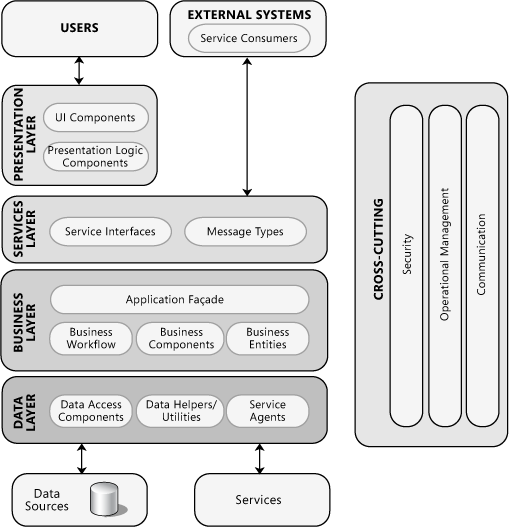
Architects now build applications with the expectations of interaction with data from other applications as well as user data and results from internal operations. A representative application diagram follows:

As an example, please imagine this diagram as one of several, stacked one above and one below:

  • The ‘External Systems / Service Consumers’ box at the top accepts inputs / actions from the ‘Services’ box at the bottom of the diagram above it.
  • Each application emits data to one-to-many systems and potentially receives data from many other systems.
  • The applications are loosely-coupled, without persistent connections to each other .. each connection and data interactivity is made on-demand.  These applications must be written to manage these connections and contain robust failure management in the case a connection cannot be made within the SLA.

Real-world use of this paradigm doesn’t really involve stacking .. rather, the applications are loosely-coupled, exchanging data along published endpoints. Note that connecting external applications to exchange data introduces interdependencies which can create performance risks. These can manifest themselves with SLA impact or expose consuming applications to security risks, hence the need for APM.

APM Use Cases

Five common use cases for application performance monitoring include:

  • Detecting and diagnosing performance issues within an application or service. By monitoring key performance metrics such as response time, latency, throughput and error rates, teams can quickly identify and troubleshoot issues before they impact end users.
  • Helping teams plan and optimize their capacity by monitoring resource utilization, identifying bottlenecks and forecasting future demand. This enables teams to allocate resources more efficiently and avoid over- or under-provisioning infrastructure.
  • Tracking SLAs that define performance thresholds and uptime requirements. Application performance monitoring helps teams enforce SLAs by monitoring key performance metrics and alerting teams when SLAs are at risk of being breached.
  • Monitoring user experience by tracking user behavior and engagement metrics such as session length, path through the application, application abandonment and conversion rates. This help teams identify usability issues, optimize user flows and improve overall user satisfaction.
  • Security and compliance through monitoring access logs, audit trails and other security-related metrics. This helps teams detect and respond to security incidents, identify compliance gaps, and maintain regulatory compliance.

APM is a powerful tool to monitor an application orchestration enabling application owners to manage performance, security, SLAs and so much more.

APM Providers

Several vendors have capabilities in the space. Given the complexity, there is a lot of overlap and virtually no ‘one size fits all’ solutions. With that said, not all end customers require an OSFA solution and will select a vendor that fits their needs. A short list follows:

VendorProduct / CapabilitiesNotes
AppNettaAppView: End-user experience on the web. FlowView: Application usage to network bandwidth correlation. PathView: Monitoring and troubleshooting along the network path from the end user to your application.Delivered as a SaaS solution.
DatadogApplication-based APM. 
DynatraceObservability, security and AIOps. 
ExtraHopStream analytics platform providing visibility into activity in an IT infrastructure.Captures raw, unstructured data streams and converts these into cogent metrics.
New RelicFull-stack APM capabilities, including application, hybrid and public cloud, infrastructure, mobile and web site. 
ManageEngineIncludes server monitoring, application server monitoring, database monitoring, web services monitoring, virtualization monitoring, cloud monitoring and an array of other application management capability.ME also provides managed IT services.
PulsewayMobile-based APM. 
Sumo LogicTool consolidation across DevSecOps. 

ED: As Article Publish dates are frozen in time, it is quite possible reviewed vendors and their capabilities may have advanced beyond those presented herein. Please accept my apologies for my shortcomings. A note to vendors: please reach out to advise your current offering capabilities and I will update.

APM Audiences

While APM is not industry-specific, there are a few industries with critical needs for APM:

  • Healthcare organizations rely on complex applications  to deliver critical patient care services and must know if parts of their orchestration are not performing properly.
  • E-Commerce companies rely on complex orchestrations that include shopping carts, inventory management, fulfillment, payment and more. They must know if components within their orchestration are underperforming
  • Managed Service Providers / Cloud Service Providers use APM to monitor their operations and provide reports to their customers.

Within (and beyond) these industries, there are several buying audiences:

  • IT Operations are responsible for ensuring the smooth functioning of an organization’s IT infrastructure. They can use APM products to monitor the performance of critical applications and identify potential issues before they impact users.
  • Application and Integration Architects can use APM during prototype and proof of concept stages of offering development to ensure dependent systems can scale
  • Developers need to ensure that their applications are performing optimally. They can use APM products to identify performance bottlenecks and optimize code to improve application performance.
  • Product Owners care deeply about their offerings and are always looking for ways to improve it to gain market share. One way is to expand their offering to leverage outside services (traffic overlays atop mapping software as an example). However, once services are added, complexity increases and dependencies on these external data / operations rise to the fore. APM helps Product Owners and their development teams identify errant services, missed SLAs and the like.

Again, any organization with application integrations is a candidate for APM.

Conclusion

Any business that manages applications and integrations should look closely at APM. APM helps businesses to optimize their application orchestrations and can improve customer experiences while saving money by reducing costly downtime. Organizations benefit when they identify and address application performance issues quickly and can deploy maintenance personnel directly to the issue. The benefits of APM are significant and help businesses improve their operations, enhance customer satisfaction and increase profitability.

5W – Business Process Management (BPM)

Thank you for reading! Please see “Why 5W?”  for context, methodology and disclaimers.

BPM Overview

Businesses can make repeatable processes more stable and efficient by engaging with the Business Process Management (BP​​M) paradigm. BPM is a well-defined set of disciplines for breaking down, standardizing and executing the steps in a business process to achieve efficiencies. BPM is a systematic approach to managing and improving processes that drive an organization.

Business process examples include common LOB operations, like:

  • Expense reporting
  • New customer account
  • Customer ordering
  • Fulfillment and logistics

Many industry-specific business operations include:

  • Change management
  • New hire or new partner onboarding
  • Claims and returns

A representative list of BPM use cases can be found on the Appian site.

BPM Business Benefits

BPM is designed to achieve increased efficiency by identifying and streamlining inefficient processes. BPM helps organizations reduce waste, increase productivity and reduce errors. This leads to faster and more reliable service delivery, which can help organizations gain a competitive edge.

An effective BPM implementation leads to cost savings by eliminating unnecessary steps in processes, reducing the time it takes to complete tasks and minimizing the use of physical resources. Once implemented, BPM can help organizations identify other areas where automation or outsourcing may be more cost-effective.

With improved processes, customer service will improve, as organizations can respond more quickly to customer needs and provide a better overall experience. This may manifest itself as reduced wait times for customers, improved order accuracy and enhanced customer communications.

BPM can contribute to the ability of an organization to achieve and manage regulatory and standards compliance. With standardized processes and controls, organizations enjoy normalized output, reducing the time it takes to generate reports for compliance purposes. This can help organizations avoid costly fines and legal issues, and as a bonus: provide an improved reputation in the marketplace.

BPM is a pillar to help organizations improve agility and responsiveness to changing business conditions. Through standardized inputs and processes, monitoring and analysis can occur in real-time, creating opportunities for improvement and making adapt rapidly to improve the chances of success. This can help organizations respond to customer needs more effectively and stay ahead of the competition.

BPM Capabilities

What makes a good BPM offering? Let’s review several key considerations and best practices that exist in the BPM discipline:

  • Automation is a key factor in successful BPM and can be achieved via a wide range of solutions, from home-grown to customizable packaged products. Automation enables repeatable steps that ensure consistent execution and makes troubleshooting easier.
  • Componentization and Reuse are other key factors in successful BPM. The ability to isolate business processes for specific purposes or that are part of a larger interaction makes the BPM system more manageable.
  • A holistic view of supporting (on which the subject process relies) and dependent (where the subject process supports other processes) business processes lends itself to an effective BPM effort.
  • Modeling as close to reality as possible ensures the needs of the audiences of business processes are met.
  • Authority and control to ensure the business processes follow the designed course.
  • Regular measurement interactions and feedback from audiences are a necessity.
  • Once processes are normalized, optimization can be executed on an ongoing basis.

Businesses contend with numerous inefficiencies which lead to unnecessary costs, poor quality and low customer satisfaction. By utilizing BPM and carefully analyzing processes, businesses can discover areas of improvement. Implementing BPM can help increase quality, production and efficiency by cutting out unnecessary procedures and improving vital processes.

BPM means understanding business processes to ensure they run efficiently and are continuously improved. BPM is an activity, a practice or a discipline .. even a journey. It is not a product.

Three main components of BPM:

  • Management Approach: Company management typically defines processes by identifying activities, tracking performance and working toward optimization. Management should look closely at ‘build versus buy’, as many processes are already created and documented, requiring only small modifications, or none at all.
  • Methodology: Deploy a steady cycle of improving business processes, helping businesses advance the efforts in phases, defined activities and best practice techniques.
  • Technology: BPM technology includes software that can map and record business processes to enhance analytics and communication. Technology helps automate activities and track performance.

In essence, BPM technology helps businesses have a clear understanding of various processes within the company in order to boost performance, quality and efficiency.

BPM Use Cases

A few brief samples for review and clarification:

  • Use Case: Expense Report
    • Employee incurs a business expense.
    • Employee completes an expense claim form in an automated system.
    • The form is routed to a manager who will approve or reject the form.
    • If the expense is over a certain amount, it may be routed to a senior manager (many BPs keep a lower-level manager in the loop for visibility).
    • The appropriate manager approves or rejects the form.
    • The approved form is sent for payment -or- the rejected form goes back to the employee for more clarification.
    • The form is sent for payment.
    • A check / credit is issued to the employee.
  • Use Case: Order Entry and Fulfillment
    • A sales representative closes a business deal.
    • The sales representative enters the order into an automated system.
    • The order is routed to a manager who will approve or reject the order.
    • If over a certain amount, the order is submitted into a credit approval process.
      • The sales representative, the manager and a senior manager are notified.
      • Credit approval or rejection will determine a discrete set of tasks.
    • When approved, the order is sent to fulfillment.
      • If a physical product, is routed to an appropriate warehouse; fulfillment intelligence determines which warehouse or if an order needs to be sent to manufacturing.
      • The sales representative, the manager and a senior manager are notified.
      • The customer is notified.
    • The order ships.
      • Singly or in multiple batches.
      • From one warehouse, or many.
    • The invoice is sent to the customer.
      • The sales representative is notified.
      • The order is placed into a periodic (weekly or monthly) report.
      • Accounting is notified of the customer purchase, ensuring a future credit check will take this order and invoice status into account.

Dynamic BPM systems include the logic referenced above, typically based on customer history, internal accounting practices and so on. Alerts keep interested parties in the loop and managers play a keep role in approving or rejecting steps to keep the process flowing.

BPM Providers

BPM providers run the gamut of automation / integration, to use-case-specific components like payroll and expense. The former lot is preferred if an organization has already automated business processes, the latter supports an organization evaluating a BPM roadmap. Your mileage may vary, depending on organizational maturity, incumbent systems, BPM priorities and more. Some companies in the space:

VendorOffering / CapabilitiesNotes
Appian Deployed as a platform with a wide variety of adaptable, low-code integration and automation solutions.
Bonitasoft Open-source BPM platform. Provides a number of self-contained applications and integration components.
blueprisim Now SS&C and blueprism. Offers a wide variety of department-level use cases.
IBMIBM Business Automation WorkflowA cloud-based BPM platform enabled with process automation, decision management, and case management capabilities.
MicrosoftMicrosoft Power AutomatePart of the Power Platform, Power Automate is a cloud-based BPM tool that allows users to automate workflows, create custom business processes, and integrate with other Microsoft applications. Offers a trial.
NintexProcess PlatformOffers a wide variety of pre-built solutions across industries. The Process Platform page has a good overview of the steps management should review as a means to plan their roadmap.  Acquired K2 in 2020.
OracleOracle BPM SuiteA member of the Oracle Business Process Management Suite, BPM is a complete set of tools for creating, executing, and optimizing business processes.
PegaPega Platform Data Integrations Security and ComplianceDeployed as a platform with a wide variety of adaptable, low-code integration and automation solutions. Offers a number of pre-built BPM solutions.
Zoho A platform filed with a wide variety of pre-built LOB applications.

ED: As Article Publish dates are frozen in time, it is quite possible reviewed vendors and their capabilities may have advanced beyond those presented herein. Please accept my apologies for my shortcomings. A note to vendors: please reach out to advise your current offering capabilities and I will update.

BPM Audiences

BPM will provide benefits to virtually any company. A few industry examples and benefits:

  • Manufacturing can deploy BPM to improve production processes, reduce waste and ensure product quality.
  • Financial institutions can deploy BPM to improve regulatory compliance, automate back-office processes and increase efficiency.
  • Healthcare can optimize patient care processes, reduce administrative burden and improve patient outcomes.
  • Retail can deploy BPM to optimize supply chain processes, manage inventory and improve customer service.
  • Educational institutions can deploy BPM to optimize student enrollment processes, improve administrative efficiency and enhance student outcomes.
  • Technology companies can deploy BPM to optimize software development processes, improve project management and increase efficiency.
  • Transportation companies: BPM can help transportation companies optimize logistics processes, reduce transportation costs, and improve customer service.

When offering a BPM solution to a prospect, consider these audiences and their motivation to deploy BPM:

  • Business leaders like the CEO, CIO and CTO typically make the final decisions, but unlikely the conversation will start with them. With that said, being prepared to speak with these audiences once an engagement has worked up the chain is a critical factor for success. They will be most interested in BPM because it can help them realize strategic goals such as improving efficiency, reducing costs and increasing customer satisfaction. They will not be interested in the ‘how’, or ‘when’ (with the exception of ASAP) .. they’ll just want it completed, on time and under budget.
  • Operations managers are interested in BPM as standardizing business processes will help them operate more efficiently by reducing waste and improving productivity.  By automating routine tasks and freeing up employee time, businesses can focus on more strategic initiatives and drive innovation.
  • IT professionals are interested in BPM beyond implementation: BPM enables the use of technology to automate processes and improve efficiency. IT will prove to be an active audience as BPM is rolled out, so their support is critical.
  • Compliance officers will see value in BPM as enacting stringent standards and practices for data collection will help them ensure that the organization can meet regulatory requirements and best practices.
  • Employees will embrace BPM as it automates time-consuming and repetitive tasks, leading to a more efficient and productive workplace. Getting employees on board is an important factor in a BPM effort. Involving employees during the scoping process will improve chances of success as employees can provide field-level experience: what are the good things about current processes, in what areas can BPM assist most effectively, and so on.
  • Consultants and analysts are interested in BPM because it is a growing field that provides opportunities for consulting engagements, research and analysis.

Any organization with business processes in any state is a candidate for a BPM discussion.

Conclusion

Business Process Management can provide a wide range of benefits to organizations, including increased efficiency, cost savings, better customer service, improved compliance, and agility. By implementing BPM, organizations can gain a competitive edge, reduce costs, and improve their overall performance.