Windows Azure SQL Database Premium Preview

As of today, Microsoft is offering access to a limited preview of the new Windows Azure SQL Database Premium service. As opposed to non-Premium, the new offering provides reserved instances for databases requiring higher performance capacity and predictable performance.

To sign up:

  • Visit the Preview Page and click the ‘Try it Now’ button.
  • When approved, visit the Windows Azure portal and request a Premium Database Quota assigned to your Cloud Services.

For the Preview, customers will be limited to one database per logical server, priced at 50% of the eventual GA pricing. Please see the Windows Azure SQL Database Premium page for more details and availability updates.

Windows Azure GA Update: Web Sites, SSL and Mobile Services

Wahoo .. Windows Azure Web Sites Standard Tier (Reserved are already in GA) are now released to General Availability, along with SSL support .. a big boon for folks seeking to deploy scalable, highly-available commerce-enabled web sites. If you’re ready to get started, sign up for a trial and check out:

Windows Azure Mobile Services are good to go in GA as well, sporting a high-availability SLA for services running in Standard and Premium tiers. Mobile Services makes it fast and easy to create a mobile backends for a number of devices, simplifying authentication and push paradigms .. why reinvent the wheel? Besides the services aspects, a number of native SDKs for devices and Windows Store are available today.Here are a few links to get you started:

For some of the latest bits, please navigate to the Build 2013 site held in June 2013 .. the session content is online and as fresh as it gets, speeding your way into the Cloud!

I’ll see you there.

Windows Azure Remote Desktop Services

Great news for the Virtual Desktop Interface (VDI) types out there: as of July 1, Microsoft now allows Remote Desktop Services (formerly called Terminal Services) licenses in Windows Azure Virtual Machines. Prior to this licensing update, you were only allowed to connect to the console of your VM for administrative purposes, and only up to two users at a time. With this new licensing modification, customers can now connect as many users as they have system capacity, and of course, licenses.

For complete details about licensing, please see:

The short version:

  • RDS Client Access Licenses (CALs) that are part of a a VL agreement are NOT eligible for license mobility rights, per the FAQ.
  • Windows Client desktops (Windows 7 or Windows 8) are also not allowed in Windows Azure, or any other Service Provider (Amazon, Rackspace, etc.) as multi-tenant hosting is not covered by PUR.
  • To increase users beyond the two administrative sessions you need to purchase RDS Subscriber Access Licenses (SALs) through the Microsoft Services Provider Licensing Agreement (SPLA) for each concurrent user accessing the VM. SPLA licenses are obtained through SPLA Resellers.

Common use cases include:

  • Partner-Hosted Microsoft Office: running a VM with Microsoft Office installed.
  • Thick-client application hosting (common RDP scenarios for complex, client-side applications).
  • Demo, test and legacy environments.

This is a major benefit to cost- and maintenance-conscious IT professionals, and yet another reason to get into the Cloud!

I’ll see you there.

Seattle to Portland – STP 2013* (the ride with the asterisk)

For my third year, I had the pleasure to ride with 9,999 of my fellow bicycle riding buddies in the 2013 Seattle to Portland Bicycle Classic. The ride was approximately 203 miles this year, and I completed in a single day.

WP_20130713_013Why the Asterisk? Well:

  • I made amazing time for the first half of the ride, arriving at the half-way point (Centralia, Washington) at 11:45am, 6 hours and 45 minutes after departing the UW parking lot starting point. As it’s about 100 miles, averaging 14.81 mph (with stops).
  • I had a tire blow out (not to be confused with a flat) 1,000 feet short of the Napavine mini-stop (the top of a nicely challenging hill .. see the route map for details). Not knowing any better, I attempted to repair the blown tube, and then trying a new tube. Note that a blowout looks a lot like the results of the scene in ‘Alien’, where the innards become ‘out-ards’. While I didn’t know this at the time, a hole that size will simply destroy the tube within. I know better now.
  • The first repair (including patching the original tube) took 30 minutes; the second, 15 (putting in a new tube). Upon inflating the tire and heading up the hill, the new tube gave way, and I was pushing the bike up the hill.

My hope was there would be a mechanic at the Napavine site .. unhappily, the nearest was 13 miles back and 14 miles forward. At that point, I made the call. The ride is fully-supported .. that is, there are supplies and mechanics at nearly every stop .. except for this one. I made the call to the support number, and the truck arrived to collect me. after that, a 14-mile ride in the truck and I was on my way .. losing over three hours in the process.

As you know, figures lie and liars figure .. but some math is in order. For the back half of the ride (my trip computer reset while my bicycle was upside down .. argh). Napavine is mile marker 112, Vader at 126, 77 miles from the end of the ride. I rode for just short of 6 hours (including stops), arriving just before 10pm. So, the breakdown:

  • 6.75 hours for the first 99 miles (5am to 11:45am .. including stops).
  • 1 hour at Centralia (insane long lines for one-day riders).
  • 1 hour until the blow out .. 3 hours lost / 14 miles in the truck.
  • 6 hours for the last 77 miles (4pm to 10pm).

So, I got to enjoy the ride so much more than my fellow one-day riders .. 17 hours, all told .. but just under 13 hours pedaling / taking breaks, a respectable (for me 15.6 mph overall. Would have beaten a personal record, if not for the snafus.

All that .. an amazing day. Please check out the ride on my Endomondo feed.

Windows Azure at WPC

Finally taking a break, triple-tall-vanilla-soy-latte in hand and electrons flowing into my laptop. Windows Azure news from the Microsoft Worldwide Partner Conference 2013 in Houston:

  • The Windows Azure SQL Database will boast a premium offering shortly. As a shared database-as-a-service platform component, tenants can suffer from ‘noisy neighbors’, where other customers’ activities can impact your database performance. The premium offering will help manage this by assuring higher bandwidth and dedicated CPU capacity.
  • Windows Azure Active Directory integration will improve over time as well. Microsoft is working with several third-party SaaS vendors to integrate identify services with AD.
  • Limited previews of these updates will be made available in the coming weeks.

Autoscaling in Windows Azure

In better than 1/3 of my customer contacts, the term ‘autoscale’ comes up. This term (loosely defined) relates to increasing computing capacity to load levels (in non-fancy talk, it means you have enough servers to make sure you don’t tip over when too many users visit / interact with your site).

Companies are keen to ensure that they can take full advantage of the elastic aspects of the cloud: the ability to deploy more resources when they are needed, and take them down when they are not.

Some examples, you ask? There are more than a few application scenarios / patterns that present themselves. If your application fits any of these types of patterns:

    • On / Off application patterns: if you only need a system at definable intervals (payroll, training, accounting systems, and so on) .. the per-minute usage charges of Windows Azure go a long way toward cost savings and usage optimization.
    • Predictable burst activity pattern: maybe your site serves users around identifiable dates (Valentines’ day, Mothers’ day, the silly season, and so on). The elastic nature of Windows Azure Cloud Services enables you to supply additional capacity to manage your customer load requirements.
    • Unpredictable growth pattern: it is expensive and time-consuming to deploy server capacity before it is actually needed .. something startup companies deal with every day. PAYG and elasticity can help small companies grow on their own time, using current cash flow to support their capacity requirements.

Using an autoscaling scenario may meet your needs, optimizing usage / capacity considerations while balancing these against the ultimate cost. A few considerations:

  • Are you short on time and implementation skills, requiring an immediate and managed solution?
  • Do you have an experienced (or willing to learn .. my favorite) development / implementation staff?
  • Do you want something easy, inexpensive and unmanaged?

Depending on your scenario and competency:

    • If short on time and / or lacking implementation as a core competency, companies like RightScale offer managed (read: for a price) solutions to monitor and manage your capacity based on rules that you set. You can try RightScale at for free, but be mindful of ongoing costs and balance them against operational efficiencies.
    • If you have a bit more time and an able development staff, the Autoscaling Application Block is a component you can add to your code that will give you greater control over when and how your capacity will be increased. Ready to get started? Please check out How to use the Autoscaling Application Block from MSDN. Ready for a ‘geekend’? Here’s the Autoscaling Namespace.
    • For easy and unmanaged (well .. managed, but by you .. but not in real time), we’ve recently announced portal-controlled autoscaling options in preview. These features are available in the Windows Azure Portal for your cloud services.

On the third point above, Scott Guthrie posted an update to the platform from the Microsoft Build conference regarding GA for paid websites and mobile services AND autoscale support .. complete with screenshots (check out the “How to enable autoscale section”.

In short (too late!) options abound; at least one to meet the the technical requirements of your project, or the technical skills (and time allotted) to your dev team. Here we are: yet another way to improve and optimize our experiences in the Cloud!

I’ll see you there.

Schmaltz ..

.. sort of defines me. Not that I’d confess that ..but  let’s discuss:

So .. when I can, I find the Schmaltz story on the video player on a plane. You’ll LOVE how the Web defines it:

.. I get that (those).

You’ll find me, on the aisle, watching an unnecessarily sentimental film and feeling deeply about it.

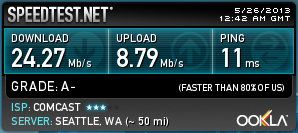
Thanks Comcast!

New modem .. wahoo!

image

New Digs, New Speed

Just ran a quick speed test from my mobile phone in my new digs .. the first is over Wi-Fi (Comcast). The second is LTE (ATT).

image

In a word: wow.

Hiding Everything on Facebook ..

Dear Lord .. how does this happen?

I am sure, through a convoluted series of posts and ‘accepts’ that it does.

Let’s not let THAT happen again.